
Transforming Corporate Fiscal Governance: The New Paradigm in Enterprise Accounting
In today’s volatile commercial landscape, chief financial officers (CFOs), enterprise controllers, and business leaders face a growing challenge: traditional bookkeeping software is reactive, fragmented, and vulnerable to operational leakages.
As organizations expand across multiple project sites, regional branches, and service lines, finance teams frequently encounter four major operational bottlenecks:
- Untracked Project Cost Overruns: Expenses incurred on one client engagement are inadvertently masked by revenue from another.
- Post-Closing Retrospective Edits: Unlocked historical accounting periods allow backdated voucher entries, compromising audit integrity.
- PDC Liquidity Blindspots: Outstanding post-dated customer cheques sit unindexed, complicating cash flow forecasting.
- Language & Regional Barriers: Multi-lingual operational staff struggle with rigid, single-language financial software interfaces.
To overcome these structural hurdles, AQLign FinaSys Pro AI was architected from the ground up—combining automated double-entry ledger mechanics with real-time budget ceiling blocks, multi-dimensional segment cost centers, and conversational artificial intelligence.
🏛️ 1. Architectural Structural Integrity: The 4-Level COA & Control Account Engine
At the core of sound corporate governance lies a well-structured general ledger. AQLign FinaSys Pro AI implements a standardized 4-Level Chart of Accounts (COA) Tree:
- Level 1 — Head Class: Fundamental accounting classifications (Assets, Liabilities, Equity, Revenue, Expenditure).
- Level 2 — Control Group: Primary balance sheet and P&L account groups (Cash & Bank Accounts, Receivables, Payables, Fixed Assets).
- Level 3 — Sub-Control Level: Regional branch allocations, vendor categories, and operational sub-groups.
- Level 4 — Detailed Transaction Ledgers: Individual accounts receiving double-entry debit and credit postings.
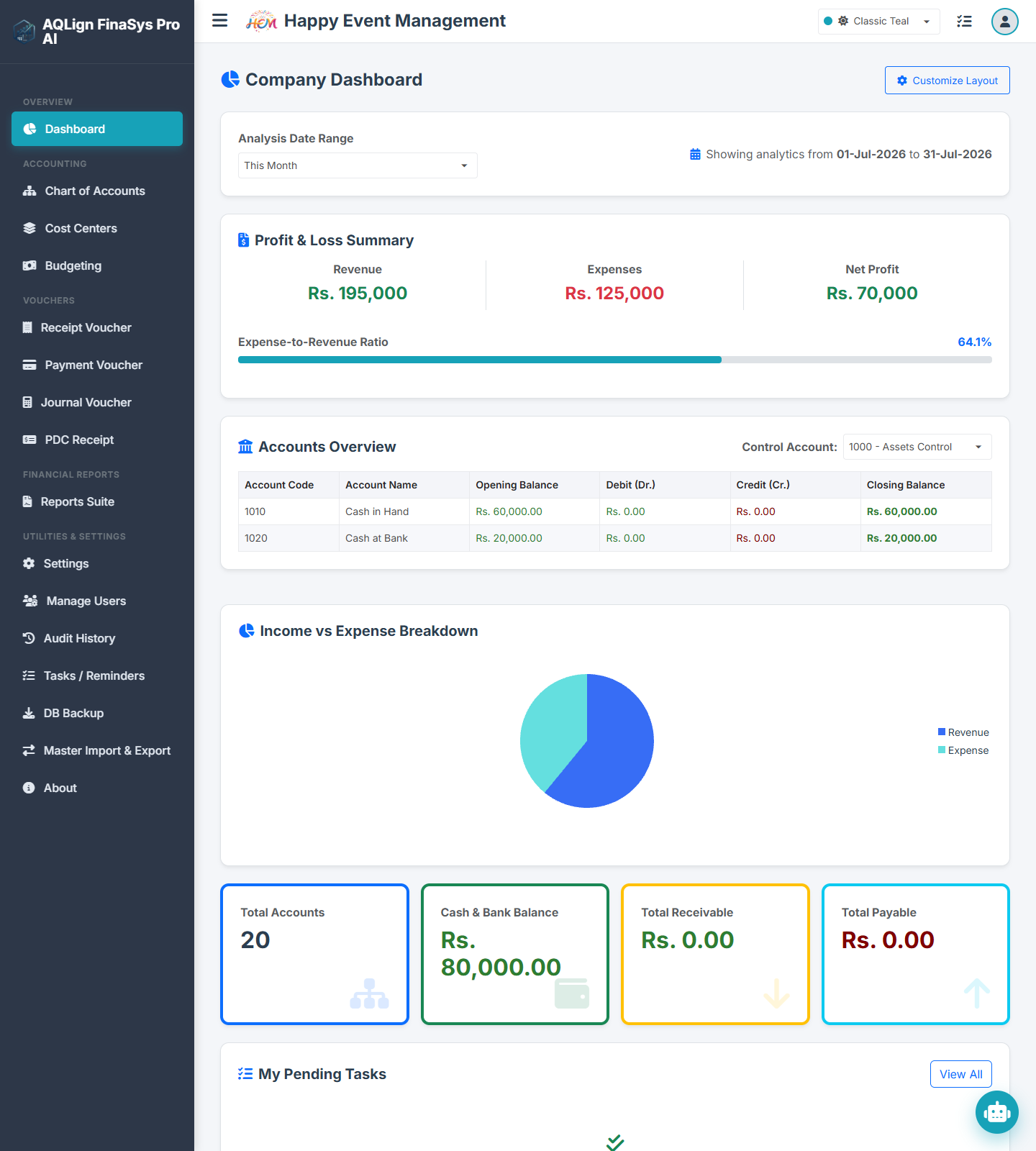
To eliminate human error during high-volume daily entry, the platform features Automated Control Account Routing. System utilities automatically map default cash ledgers (1010 Cash in Hand), bank accounts (1020 Cash at Bank), and control assets (1000 Assets Control), ensuring zero-friction voucher posting while keeping ledgers 100% balanced.
📊 2. Eliminating Segment Leakage: Multi-Dimensional Cost Center Isolation
For service-oriented enterprises—such as event marquees, housing society management bodies, educational academies, goods transport fleets, and IT agencies—evaluating overall company profit is insufficient. Leadership must know the exact net profit margin of every individual project or division.
Rather than cluttering the primary Chart of Accounts with thousands of single-use sub-accounts, FinaSys Pro AI utilizes Dimensional Cost Center Mapping. Every financial voucher (Receipt Vouchers, Payment Vouchers, and Journal Vouchers) can be tagged with a specific cost center code (e.g., CC-101 Corporate Gala, CC-102 Housing Maintenance).
Key Business Advantages:
- Segment Profitability Statements: Compile independent Profit & Loss reports for any specific project code at the click of a button.
- Overhead Isolation: Prevent unprofitable contracts from draining capital generated by high-margin service lines.
- Audit Transparency: Provide clear breakdown schedules for board reviews and joint-venture profit splits.
🛡️ 3. Active Cost Control: Real-Time Budget Overrun Caps & Fiscal Period Locks
Traditional financial software reports budget variances after money has already left the corporate bank account. FinaSys Pro AI shifts financial management from passive reporting to active pre-posting enforcement.
A. Real-Time Budget Overrun Control
Finance directors can establish monthly spending ceilings for specific expense accounts under individual cost centers. During voucher creation, the system evaluates the proposed debit against remaining monthly budget room:
- Warning Thresholds: Generates visual variance alerts when spending approaches 90% of allocated limits.
- Hard Block Enforcement: Prevents cashier or coordinator voucher posting if a transaction would breach the approved budget ceiling.
B. Fiscal Year Period Locks
To safeguard closed financial periods against unauthorized retrospective tampering, administrators can set strict Fiscal Year Date Ranges (FiscalYearStart to FiscalYearEnd). Transactions attempted outside active fiscal dates are automatically rejected across all system portals, guaranteeing 100% audit compliance for closed books.
🕒 4. Liquidity & Working Capital Precision: Post-Dated Cheque (PDC) Maturity Workflow
Managing post-dated customer cheques presents a distinct accounting dilemma: recording them immediately as cash inflates current bank balances, while holding them off-ledger risks losing track of maturity dates.
FinaSys Pro AI resolves this through a dedicated Post-Dated Cheque (PDC) Register:
- Pending Register Indexing: Cheques are cataloged with cheque numbers, issuing bank details, customer ledgers, and mature dates without altering active liquid balances.
- Automated Maturity Reminders: The system alerts cashiers when cheques reach their collection date.
- 1-Click Clearance Posting: Upon bank deposit authorization, a single click automatically posts the corresponding Receipt Voucher (RV) and updates client account ledgers.
🤖 5. Executive Intelligence & Multi-Language Accessibility (Urdu / Arabic / English)
A. Conversational Gemini AI Financial Assistant
Empower non-accounting executives to analyze complex ledgers without requesting manual spreadsheets. Through an embedded conversational interface, CEOs and managers can ask natural language questions such as:
"Which cost center had the highest expense variance this month?"
"Summarize all pending PDC cheques maturing in the next 7 days."
The integrated Gemini AI Engine queries database parameters in real time, returning concise executive digests and trend summaries.
B. Dynamic Right-to-Left (RTL) Multi-Language Engine
To support multi-lingual operations across international and regional offices, FinaSys Pro AI includes native 1-Click Language Translation:
- Supported Languages: Full UI translation across English, Urdu, and Arabic.
- Dynamic RTL Layout Mirroring: Instantly mirrors form fields, tables, and navigation menus for Urdu and Arabic script readability.
- Localized Typography & Verbal Currency: Applies specialized fonts (Noto Nastaliq Urdu, Cairo Arabic, Outfit English) and converts numeric totals into verbal currency words (Rupees, Paisa, Dollars, Dirhams) on printable invoice slips.
🔒 6. Security Governance: Role-Based Access (UAM) & Immutable Delta Logs
Corporate security requires strict segregation of duties between operational staff, accountants, and system administrators.
- Granular User Access Management (UAM): Configure custom user profiles to grant or restrict specific rights to add, edit, or delete vouchers, view sensitive financial statements (like Balance Sheets), or adjust master system configurations.
- Immutable Security Audit Trail (AI - Log): A cross-cutting background security monitor captures tamper-proof logs of every database interaction. If an entry is modified or deleted, the audit engine records the before-and-after transaction snapshot, username, timestamp, and source IP address.
🚀 7. Evaluating FinaSys Pro AI: Your Onboarding Journey
AQLign SYSTEMS believes enterprise software selection should be transparent, risk-free, and thoroughly validated prior to purchase.
Step 1: Request a 14-Day Free Trial Evaluation
Visitors can submit a Free Trial Request directly on our website to receive instant access to evaluate software features, test voucher workflows, and verify compatibility with their enterprise requirements.
Step 2: Localized Consultation via Authorized Partners
To ensure personalized setup, physical demonstrations, and hands-on staff training, clients can connect with our global network of Certified Authorized Sales & Service Partners.
Step 3: Enterprise Licensing & License Issuance
The pricing listed on our website configurator represents the Base Software License Price for cloud hosting, automated R&D updates, and standard documentation. Your selected Authorized Partner handles local implementation and ongoing SLA support, while AQLign SYSTEMS directly issues your registered enterprise license copy based on your selected edition, add-ons, and concurrent user seats.
🌐 Ready to Elevate Your Corporate Financial Controls?
- Explore Features & Pricing: Visit the official AQLign FinaSys Pro AI Product Page to configure your enterprise edition and request a free trial.
- Connect with Local Experts: Browse our certified network on the Authorized Partners Page for on-premises deployment guidance.